django-statsd
v3.0.0Django app that submits query and view durations to statsd.
$ uv add django-statsdTwo middleware entries, and every view, query, template and Celery task in your Django project reports its duration to statsd.

That recording is real. So is every transcript below: they are produced by running the code and checked by the test suite, so a claim on this page cannot outlive the behaviour it describes.
Quick Start
pip install django-statsd
INSTALLED_APPS = [
    'django_statsd',
]

MIDDLEWARE = [
    'django_statsd.middleware.StatsdMiddleware',
    'django_statsd.middleware.StatsdMiddlewareTimer',
]

STATSD_HOST = '127.0.0.1'
STATSD_PORT = 8125
STATSD_PREFIX = 'myproject'
STATSD_TRACK_MIDDLEWARE = True
The tracker goes at the top of MIDDLEWARE and the timer at the
bottom. Your own middlewares go between them, and the pair times
everything in between.
What you get
One GET /dashboard/ puts this on the wire:
myproject.view.get.myproject.views.dashboard.hit
myproject.view.get.myproject.views.dashboard.process_request
myproject.view.get.myproject.views.dashboard.process_response
myproject.view.get.myproject.views.dashboard.process_view
myproject.view.get.myproject.views.dashboard.total
myproject.view.http_codes.2xx
myproject.view.http_codes.hit
myproject.view.site.hit
total is the request, the three process_* names are the phases
inside it, and hit is a counter so you get a rate per view without
dividing anything. The last two are project-wide.
Features
- Views timed by method and dotted view path, with status classes counted separately
- Queries timed through Django's
execute_wrapper, nested under the view that ran them, so you get query time per view - Celery tasks timed per task, plus a counter for every signal Celery exports
- Templates,
jsonandredispatched on import and timed without a line of configuration - Your own code, timed through
request.statsdor the module-level helpers, nested under the view that was running - Async safe. The scope lives on
asgiref.local.Local, so ASGI and async views report correctly
Requirements
- Python 3.10 through 3.14
- Django 5.2, 6.0 or 6.1
Celery and redis are optional. django-statsd patches them if they import and does nothing if they don't.
Where your milliseconds go
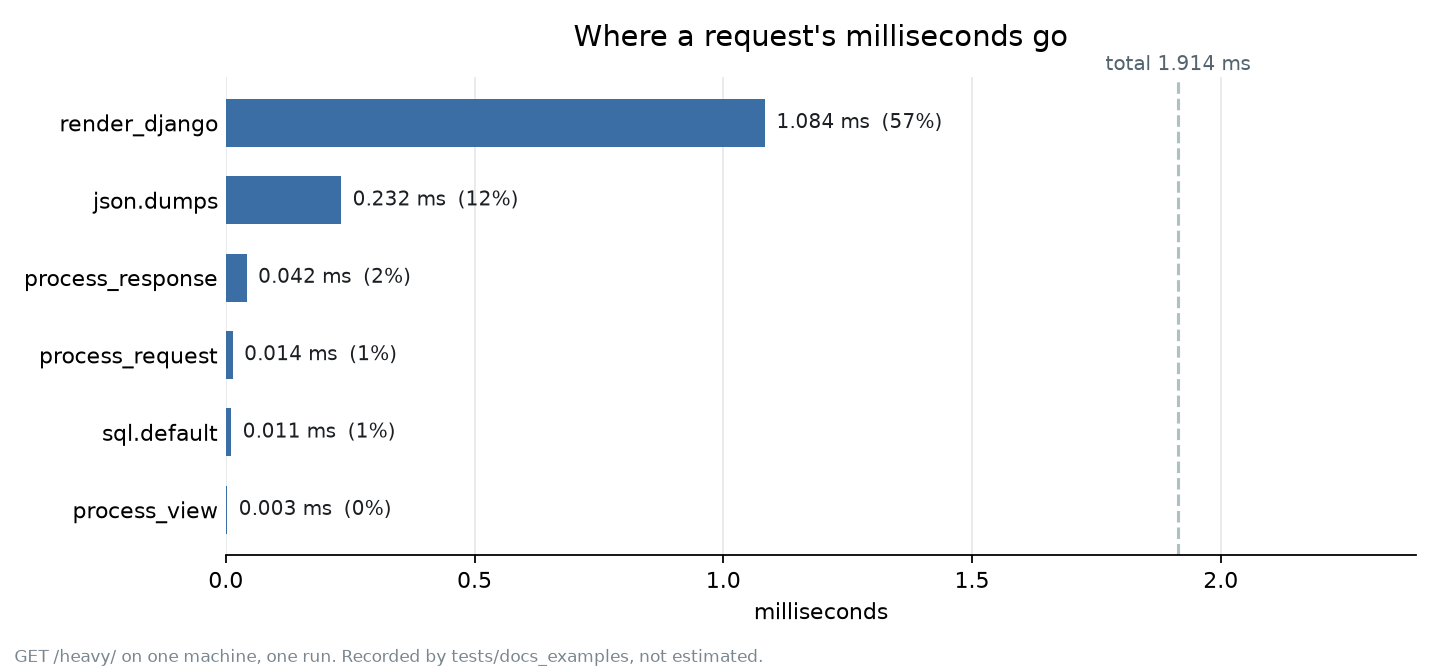
Recorded from a real request. The phases don't sum to
total, and the gap is the part of the request outside the section
the middleware pair wraps.
Usage Examples
Time a block inside a view through request.statsd:
def some_view(request):
    with request.statsd.timings('build_queryset'):
        ...

def some_other_view(request):
    request.statsd.timings.start('build_queryset')
    ...
    request.statsd.timings.stop('build_queryset')
Or reach the same scope from anywhere during a tracked request, and from inside a Celery task:
import django_statsd

with django_statsd.with_('payment.authorise'):
    ...

django_statsd.incr('payment.attempt')

@django_statsd.decorator('payment')
def authorise():
    ...
Both land nested inside the view that was running, so the same helper called from two views gives you two series.
In a dashboard
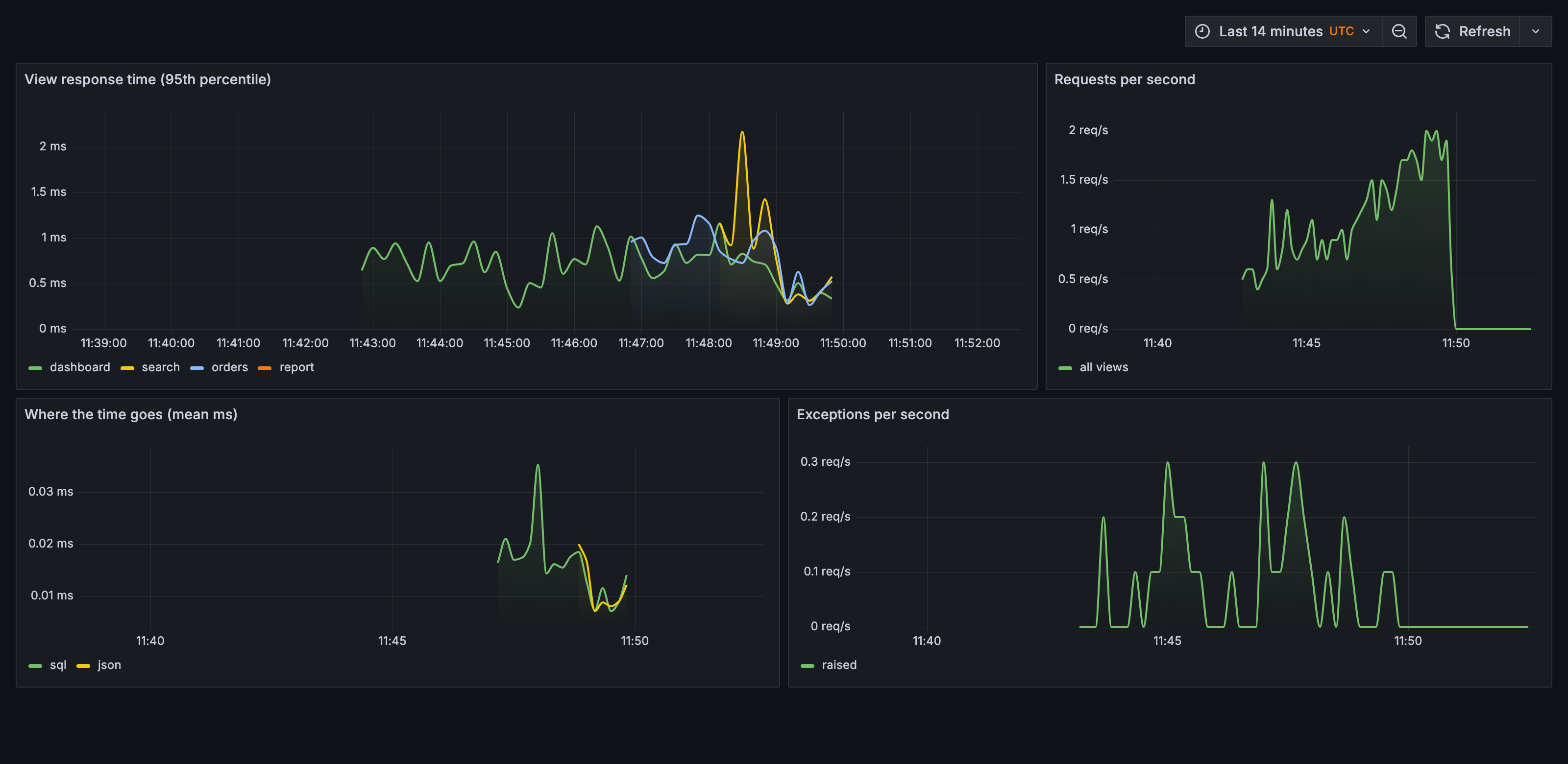
statsd, Graphite and Grafana, fed by django-statsd over UDP. The
compose file and the provisioning that produced this are in
docs/generate/dashboard/.
Settings
| Setting | Default | What it does |
|---|---|---|
STATSD_HOST |
127.0.0.1 |
Where to send |
STATSD_PORT |
8125 |
Which port |
STATSD_PREFIX |
none | Nests every metric under one name |
STATSD_TRACK_MIDDLEWARE |
False |
The view metrics |
STATSD_TRACK_DATABASE |
False |
Query timings |
STATSD_SAMPLE_RATE |
1.0 |
Odds a metric is really sent |
STATSD_VIEWS_TO_SKIP |
admin | Regexes of views to ignore |
STATSD_DISABLED |
False |
Loaded and silent |
STATSD_DEBUG |
DEBUG |
Warn about unstopped timers |
Full list with docstrings: settings reference.
Documentation
Contributing
See CONTRIBUTING.md. Every code sample on this page is executed by the test suite, so a change to the API that breaks an example fails the build.
Links
License
Details
- Version
- 3.0.0
- License
- BSD-3-Clause
- Python
- >=3.10
- Maintainer
- Rick van Hattem
Release Cadence
Maintainers
- Rick van Hattem · [email protected]